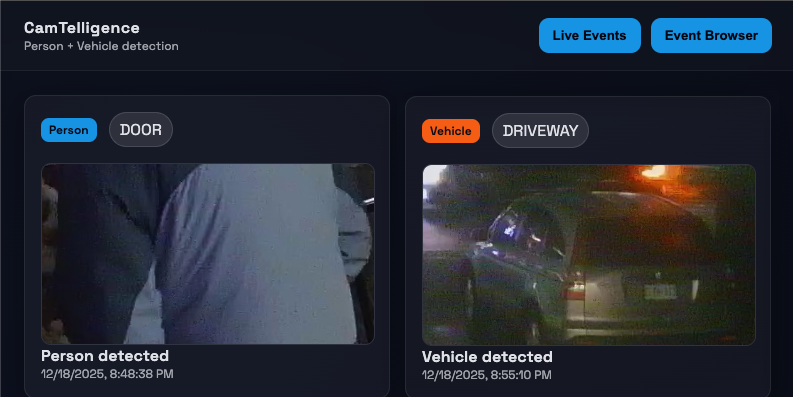
CamTelligence - AI Integration for my Dumb Security System
CamTelligence Architecture Deep Dive
A local-first, CPU-first event pipeline for person/vehicle activity
Grand Objective
CamTelligence is a self-hosted camera intelligence pipeline that runs locally on CPU and converts continuous video feeds into discrete, human-meaningful person and vehicle events. The system sits between sensors and an operator, reducing alert noise and surfacing only activity worth attention.
My current DVR approach fails because:
- Record everything → Storage explodes; I still scrub footage.
- No Notifications → Something has to happen for me to check the footage.
CamTelligence runs on my repurposed gaming PC, which I turned into a dedicated server. This machine provides enough CPU power to handle the local-first, CPU-first pipeline efficiently, while also offering the flexibility to expand or tweak the system as needed. By leveraging existing hardware, I avoided the need for additional infrastructure or cloud dependencies, keeping the setup cost-effective and self-contained.
Architectural Goal
This codebase takes responsibility for:
- Ingesting frames from camera streams or local sources
- Detecting motion
- Running person/vehicle detection
- Persisting events plus associated media (frames + crops)
- Exposing a queryable API and minimal UI
- Optionally sending Telegram notification
- Enforcing retention via a janitor process
- Facial recognition (Coming Soon!)
It explicitly avoids:
- Continuous video recording
- Cloud inference
The pipeline is event-focused, not stream-focused: each detection becomes a persisted “unit of attention.” The goal here is to notify me of events, not replay them. Its is meant to increase utility of my DVR instead of replace it.
High-Level Architecture
The system decomposes into components aligned to the objective:
- Processor service: multiprocess CV pipeline (ingestion → detection → writers → notifier)
- Core package: shared DB models/session utilities for processor + API
- Storage split: filesystem for JPEG media; PostgreSQL for metadata and event records
- API service: serves events + media by id/path contract
- Frontend UI: polls API for live events and basic browsing
- Janitor: retention cleanup for DB rows + corresponding media files
This layout keeps CV compute isolated from the API/UI while using the database as a stable integration point. An external broker is avoided by using multiprocessing queues, consistent with local-first deployment.
Execution Model and Data Flow
Startup: supervisor defines process boundaries and backpressure
The supervisor loads settings, creates bounded queues, and launches a fixed set of worker processes. The queue boundaries are the architectural enforcement mechanism: they define how work moves.
class Supervisor:
    def __init__(self, settings: ProcessorSettings) -> None:
        self.settings = settings
        self.stop_event = Event()
        self.processes: dict = {}
        self.frame_queue = Queue(maxsize=settings.queue_size)
        self.person_queue = Queue(maxsize=settings.queue_size)
        self.vehicle_queue = Queue(maxsize=settings.queue_size)
        self.notification_queue = Queue(maxsize=settings.queue_size)

    def start(self) -> None:
        try:
            set_start_method("spawn")
        except RuntimeError:
            pass
        # ...
        factories = {
            "ingestion": lambda: IngestionWorker(self.frame_queue, cameras=cameras, stop_event=self.stop_event),
            "detection": lambda: DetectionWorker(
                self.frame_queue,
                self.person_queue,
                self.vehicle_queue,
                self.stop_event,
                # ...
            ),
            "person_writer": lambda: PersonEventWriter(
                self.person_queue,
                self.notification_queue,
                self.stop_event,
                # ...
            ),
            "vehicle_writer": lambda: VehicleEventWriter(
                self.vehicle_queue,
                self.notification_queue,
                self.stop_event,
                # ...
            ),
            "notifier": lambda: NotificationWorker(self.notification_queue, self.stop_event, settings=telegram_settings),
        }
        self.processes = {name: factory() for name, factory in factories.items()}
        for proc in self.processes.values():
            proc.start()
Steady state: frame → motion gate → YOLO → persist → notify
- Ingestion polls camera sources or directories and creates a
FrameJob(UUID, camera, timestamp, JPEG bytes). - Detection decodes JPEG, performs per-camera motion detection; drops no-motion frames; runs YOLO only when motion exists; filters detections again by motion overlap; emits person/vehicle detection jobs.
- Event writers persist full frames and crops to disk; insert DB records for assets/events; enqueue notification jobs.
- Notifier sends Telegram messages with per-camera debounce; drops when queue full.
Backpressure: blocking where correctness matters, dropping where it doesn’t
Backpressure is implemented by bounded queues and blocking puts (with retry) in the critical path:
def _enqueue(self, job: FrameJob) -> None:
    while not self.stop_event.is_set():
        try:
            self.queue.put(job, timeout=0.5)
            logger.debug(
                "Frame enqueued",
                extra={"extra_payload": {"camera": job.camera, "frame_id": str(job.frame_id)}},
            )
            return
        except Exception:
            time.sleep(0.1)
This makes overload behavior deterministic: ingestion slows when detection cannot keep up, rather than buffering infinitely or dropping silently.
Shutdown: poison pills provide deterministic exit without a broker
Shutdown is coordinated via a shared stop event plus poison pills sent through queues:
def _shutdown(self, *_args) -> None:
    self.stop_event.set()
    try:
        self.frame_queue.put_nowait(PoisonPill())
        self.person_queue.put_nowait(PoisonPill())
        self.vehicle_queue.put_nowait(PoisonPill())
        self.notification_queue.put_nowait(PoisonPill())
    except Exception:
        pass
    for proc in self.processes.values():
        if proc.is_alive():
            proc.join(timeout=2)
This avoids “mystery hangs”: consumers exit explicitly when the sentinel arrives.
Key Architectural and Algorithmic Decisions
1) Motion gating before YOLO
Problem: CPU-first deployment cannot afford inference on every frame.
Decision: background subtraction + thresholds decide whether YOLO runs at all.
if job.camera in self.cam_buffers:
    motion_detector = self.cam_buffers[job.camera]
    motion_boxes = motion_detector.detect(image)
    if not motion_boxes:
        logger.debug(
            "Skipped frame due to no motion",
            extra={"extra_payload": {"camera": job.camera, "frame_id": str(job.frame_id)}},
        )
        continue
else:  # First frame, initialize only and run motion detection next time
    debug_dir = self.motion_debug_dir if logger.isEnabledFor(logging.DEBUG) else None
    motion_detector = MovementDetector(
        history=self.motion_history,
        kernel_size=self.motion_kernel_size,
        min_area=self.motion_min_area,
        debug_dir=debug_dir,
        camera=job.camera,
        max_foreground_ratio=self.motion_max_foreground_ratio,
    )
    self.cam_buffers[job.camera] = motion_detector

# Now run YOLO detection
predictions = self.yolo.predict(image)
The motion detector itself includes explicit guards against noise and lighting shifts:
gray = cv2.cvtColor(image, cv2.COLOR_BGR2GRAY)
fg_mask = self.subtractor.apply(gray)

_, fg_mask = cv2.threshold(fg_mask, self.threshold, 255, cv2.THRESH_BINARY)
fg_mask = cv2.morphologyEx(fg_mask, cv2.MORPH_OPEN, self.kernel)

fg_ratio = float(cv2.countNonZero(fg_mask)) / float(fg_mask.size)
if frame_idx < self.warmup:
    return []
if fg_ratio > self.max_foreground_ratio:
    return []

# ...
if area < self.min_area:
    continue
# ...
motion = total_area >= self.area_threshold
Trade-off: static true positives (standing still, parked vehicles) are biased against. The design accepts this because the product goal is actionable activity, not comprehensive scene understanding.
Motion Lab: Treating Motion Gating as an Optimization Problem
In a CPU-first pipeline, motion gating is the highest-leverage control surface: if the gate is noisy, YOLO gets spammed; if it’s too strict, real activity never reaches inference. In practice, getting this gate “right” is not a single threshold tweak—it’s an optimization problem over interacting parameters and camera-specific noise (lighting shifts, compression artifacts, trees/shadows).
To make tuning repeatable and debuggable, CamTelligence includes a small offline workflow under scripts/motion_lab/:
scripts/motion_capture.py: capture a deterministic frame corpus toscripts/motion_lab/frames/scripts/motion_experiment.py: replay frames with a specific parameter set and write artifacts toscripts/motion_lab/experiments/<label>/{masks,annotated}/scripts/motion_optimize.py: search the parameter space and export artifacts for the best candidate
The core experiment algorithm is the same one used in the runtime gate (KNN background subtractor + threshold + morphology), and was sourced from a great Medium article by Dr. Lee. “””
Decision Variables (what gets optimized)
The motion gate exposes a small set of “knobs” that jointly determine sensitivity and robustness:
history: background model memory forcreateBackgroundSubtractorKNNkernel_size: morphology kernel used to clean the foreground maskthreshold: binarization threshold for the raw foreground mapmin_area: smallest contour area considered as meaningful motionarea_threshold: total motion area required to declare “motion”max_fg_ratio: guardrail to ignore “everything is foreground” lighting events
These parameters interact: e.g., raising threshold reduces speckle but can break up contours, which then needs a different kernel_size/min_area to avoid missing motion.
Objective Function (what “best” means)
On a fixed captured dataset, the optimizer scores a candidate by how often it disagrees with expected motion/no-motion on a small labeled window (for a given camera installation). Concretely, it minimizes invalid/considered where:
invalid: frames wherepredicted != expectedconsidered: frames not skipped by warmup/foreground-ratio guards
This is intentionally installation-specific. The goal isn’t “universal motion detection”—it’s a stable gate that protects inference cost on this camera with this noise profile.
Optimizer Architecture (why it’s operable)
The optimizer is structured as a three-stage, artifact-driven loop:
- Deterministic input:
motion_capture.pyfreezes a live feed into a reproducible corpus so tuning isn’t hostage to real-time variability. - Pure evaluation:
motion_experiment.pyis a single-run, parameterized replay that produces inspectable outputs (clean masks + annotated frames). This makes false positives/negatives legible without relying on logs. - Parallel evolutionary search:
motion_optimize.pytreats tuning as search:- initialize a random population over the parameter ranges
- evaluate candidates (in parallel via
ProcessPoolExecutor) with caching keyed by the parameter label - keep an elite set, then use crossover + mutation to generate the next generation
- early-stop when the best candidate reaches zero invalid frames
The key design detail is that the optimizer doesn’t just print “best params”; it can export the same masks/ + annotated/ artifacts for the winning candidate. That means every tuning run ends with a concrete visual explanation of why the chosen settings are correct (or where they still fail).
How this solved the real problem
On real cameras, motion gating failures aren’t subtle: one bad max_fg_ratio or threshold combination can turn a lighting change into “motion everywhere”, which cascades into runaway inference and backlog. The motion lab made this diagnosable:
- false positives show up as noisy/filled masks and excessive bounding boxes
- false negatives show up as empty masks or overly aggressive filtering
And because the optimizer evaluates candidates in parallel and caches results, iterating on parameter bounds and labeling assumptions becomes fast enough to be practical on an hour or so of video_frames.
Trade-off: the optimizer is only as good as the expected-label assumptions for the captured dataset. That’s acceptable here because the goal is a camera-specific gate that keeps the pipeline stable and useful. Also, There is quite some tolerance in the results.
2) Motion-overlap filtering after YOLO
Problem: YOLO can fire on static artifacts (posters, reflections, background shapes).
Decision: keep detections only if they overlap motion regions by a minimum fraction.
def _has_motion_overlap(self, bbox, motion_boxes) -> bool:
    x1, y1, w, h = bbox
    if w <= 0 or h <= 0:
        return False
    x2 = x1 + w
    y2 = y1 + h
    det_area = float(w * h)
    threshold_area = det_area * self.motion_overlap_threshold

    for mx, my, mw, mh in motion_boxes:
        if mw <= 0 or mh <= 0:
            continue
        mx2 = mx + mw
        my2 = my + mh

        inter_w = min(x2, mx2) - max(x1, mx)
        inter_h = min(y2, my2) - max(y1, my)
        if inter_w <= 0 or inter_h <= 0:
            continue

        inter_area = inter_w * inter_h
        if inter_area >= threshold_area:
            return True
    return False
Trade-off: detections that are correct but not moving are filtered out. The goal is to suppress “background hallucinations” on CPU-first hardware without adding tracking complexity.
3) Brokerless multiprocessing with local restart
Problem: keep orchestration simple while staying resilient to worker failure.
Decision: supervisor monitors workers and restarts them locally.
def _monitor(self, factories) -> None:
    while not self.stop_event.is_set():
        for name, proc in list(self.processes.items()):
            if not proc.is_alive():
                logger.warning("Process died, restarting", extra={"extra_payload": {"process": name}})
                replacement = factories[name]()
                replacement.start()
                self.processes[name] = replacement
        time.sleep(1)
Trade-off: in-memory queues are not durable; crashes can drop work. This is consistent with local-first eventing where “best effort” is acceptable and infrastructure is intentionally minimal.
4) Polling-based ingestion (bounded and simple)
Problem: support diverse sources without complex streaming.
Decision: poll file mtimes; for streams, open-read-close per poll.
def _poll_files(self, camera: CameraConfig) -> None:
    # ...
    last_ts = self._file_cursors.get(camera.name, 0.0)
    for img_path in images:
        stat = img_path.stat()
        if stat.st_mtime <= last_ts:
            continue
        data = img_path.read_bytes()
        job = FrameJob(
            frame_id=uuid4(),
            camera=camera.name,
            captured_at=datetime.utcnow(),
            image_bytes=data,
        )
        self._enqueue(job)
        last_ts = stat.st_mtime
    self._file_cursors[camera.name] = last_ts

def _read_stream(self, camera: CameraConfig) -> None:
    cap = cv2.VideoCapture(camera.source)
    ok, frame = cap.read()
    cap.release()
    if not ok:
        return
    success, buffer = cv2.imencode(".jpg", frame)
    if not success:
        return
    self._enqueue(FrameJob(
        frame_id=uuid4(),
        camera=camera.name,
        captured_at=datetime.utcnow(),
        image_bytes=buffer.tobytes(),
    ))
Trade-off: not frame-perfect and inefficient at high FPS, but stable and bounded—aligned with CPU-first and minimal operational complexity.
Future Improvement: I plan to enhance this ingestion mechanism to boost the FPS of detections. The current polling approach, while simple and reliable, introduces latency that limits the system’s ability to handle higher frame rates efficiently. By exploring more optimized streaming techniques or leveraging asynchronous processing, I aim to reduce this bottleneck and improve the responsiveness of the pipeline.
5) Filesystem media + database metadata contract
Problem: large blobs in DB are expensive; local inspection is valuable.
Decision: write JPEGs to disk, store paths and metadata in Postgres.
class FileSystemMediaStore:
    def _write(self, media_type: MediaType, frame_id: UUID, data: bytes, tag: str = "", unique: bool = False) -> str:
        folder = self.root / media_type.value
        folder.mkdir(parents=True, exist_ok=True)
        suffix = ""
        if unique:
            from uuid import uuid4
            suffix = f"_{uuid4()}"
        name = f"{frame_id}{tag}{suffix}.jpg"
        path = folder / name
        path.write_bytes(data)
        return str(path)
The DB side treats the path as the identity for a frame asset:
def get_or_create_frame_asset(session, media_store, frame_id, frame_bytes, camera, tag="") -> MediaAsset:
    frame_path = media_store.save_frame(frame_id, frame_bytes, tag=tag)
    existing = session.scalars(select(MediaAsset).where(MediaAsset.path == frame_path)).first()
    if existing:
        return existing
    frame_asset = MediaAsset(media_type=MediaType.frame, path=frame_path, attributes={"camera": camera})
    session.add(frame_asset)
    session.flush()
    return frame_asset
Trade-off: filesystem and DB can drift on partial failures (file written, DB insert fails). The design accepts this and uses retention cleanup plus safety checks as pragmatic mitigations.
6) Event-per-detection semantics
Problem: provide useful output without tracking.
Decision: each detection yields an event row and a crop.
for detection in job.persons:
    crop_path = self.media_store.save_person_crop(job.frame_id, detection.crop_bytes)
    crop_asset = MediaAsset(media_type=MediaType.person_crop, path=crop_path, attributes={"camera": job.camera})
    session.add(crop_asset)
    session.flush()

    person_event = PersonEvent(
        camera=job.camera,
        occurred_at=job.captured_at,
        frame_asset_id=frame_asset.id,
        crop_asset_id=crop_asset.id,
        score=int(detection.score) if detection.score else None,
    )
    session.add(person_event)
Trade-off: repeated detections across frames create multiple events. Spam is handled primarily by motion gating and notification debouncing, not by temporal clustering.
7) Best-effort notifications on a non-critical path
Problem: notifications must not stall detection/persistence.
Decision: non-blocking enqueue; drop when full; debounce per camera.
def _enqueue_notification(self, job: NotificationJob) -> None:
    try:
        self.notification_queue.put_nowait(job)
    except Exception:
        logger.warning("Notification queue full, dropping", extra={"extra_payload": {"camera": job.camera}})
def _should_skip(self, job: NotificationJob) -> bool:
    last = self._last_sent.get(job.camera)
    if not last:
        return False
    return (datetime.utcnow() - last) < timedelta(seconds=self.settings.debounce_seconds)
Trade-off: no delivery guarantees, no persistence, debounce resets on restart. This is intentional: alerts are “nice-to-have” side effects.
8) Retention via a separate janitor process
Problem: always-on systems accumulate unbounded storage.
Decision: time-based cleanup of DB rows + corresponding media files.
def cleanup_retention(settings: JanitorSettings) -> dict[str, int]:
    cutoff = datetime.utcnow() - settings.retention_window
    media_root = Path(settings.media_root)
    # ...
    with get_session() as session:
        person_counts = _cleanup_person_events(session, cutoff)
        vehicle_counts = _cleanup_vehicle_events(session, cutoff)
        # ...
        session.commit()
    counts["media_files"] = _unlink_paths(file_paths, media_root)
    return counts
Safety guard prevents deleting outside the configured media root:
def _unlink_paths(paths: Iterable[Path], media_root: Path) -> int:
    removed = 0
    for path in paths:
        if not _is_safe_path(path, media_root):
            logger.warning("Skipping delete outside media root", extra={"extra_payload": {"path": str(path)}})
            continue
        try:
            if path.exists():
                path.unlink()
                removed += 1
        except Exception:
            logger.warning("Failed to delete media file", extra={"extra_payload": {"path": str(path)}})
    return removed
API + UI: Turning Events Into Something Usable
Once the pipeline can produce events, the next question is: how do I actually use them?
The answer in CamTelligence is intentionally simple: a thin FastAPI service that exposes “just enough” read/query endpoints, and a tiny React UI that polls and renders cards. No accounts, no auth, no websocket fan-out, no distributed cache. The processor does the hard work; the API/UI just makes it visible.
API surface: explicit routers, no mystery endpoints
The entire HTTP surface is defined at app startup by the routers registered in services/api/app/main.py. I like this style because it makes the public API impossible to “accidentally grow”:
app.include_router(admin.router)
app.include_router(persons.router)
app.include_router(vehicles.router)
app.include_router(events.router)
app.include_router(media.router)
app.include_router(settings_router.router)
Requests are backed by a short-lived SQLAlchemy session (create → yield → close) via services/api/app/dependencies.py. There’s no auth dependency in the router stack.
UI: two views, local state, and boring navigation
The frontend is a single-page app with two working pages: Live Events and Event Browser. There’s no URL routing; it’s just local state in frontend/src/App.tsx and two header buttons in frontend/src/components/Header.tsx:
const [page, setPage] = useState<Page>("live");
{page === "live" && <LiveEvents />}
{page === "events" && <EventBrowser />}
This “boring UI” choice matches the rest of the project: the pipeline is the product; the UI is a window into it.
Live Events: polling instead of pushing
Live Events uses polling every 5 seconds and intentionally keeps people and vehicles separate. It’s not the most elegant feed, but it’s dependable and trivial to reason about when something goes wrong:
const persons = useQuery(["persons"], () => fetchRecentPersons(100), { refetchInterval: 5000 });
const vehicles = useQuery(["vehicles"], () => fetchRecentVehicles(100), { refetchInterval: 5000 });
Architecturally, this keeps “live-ness” as a UI concern and avoids adding a streaming subsystem.
Event Browser: filters are a query, not a timeline
The Event Browser is built around one POST: POST /events/filter. The UI submits optional filters (camera, type) and the API returns two arrays (person_events and vehicle_events) rather than forcing a merged ordering. That’s a conscious trade: simpler contracts and easy debugging.
Media contract: asset ids, not filenames
Events don’t embed image bytes. They reference media assets, and the UI turns an asset.id into a /media/{id} URL. On the API side, the handler resolves the DB path under MEDIA_ROOT and returns a 404 if the file is missing. This keeps the API contract stable even if I change on-disk layout later, and it aligns with the “inspectable artifacts” theme: the filesystem holds the heavy media; the DB holds the index.
Constraints (and why I accepted them)
- Endpoints are unauthenticated. That’s fine for my local deployment, but it’s not where I’d leave it for anything Internet-facing.
- Queries are
limit-only (no cursor/offset), which keeps the API small but caps browsing depth. - Live Events polls two endpoints, which is easy to scale down later (unified feed endpoint) if request volume becomes noticeable.
Implementation Deep Dive: Ownership, Queues, and Lifecycle
Process ownership model
Each process owns distinct mutable state:
- Ingestion: camera configs, file cursors
- Detection: YOLO model, per-camera motion detectors (
cam_buffers) - Writers: media store instance, DB session per job
- Notifier: debounce map, Telegram client configuration
- Supervisor: queues + stop event; restart loop
This matters operationally: a detection crash resets motion history and the model, but does not corrupt ingestion or persistence. The cost is that in-memory state is not durable across restarts.
Queue semantics as a design language
The pipeline uses bounded queues to enforce constraints:
- Frame queue:
FrameJobwith full JPEG bytes - Person/Vehicle queues: detection jobs including frame bytes + crop bytes
- Notification queue: notification metadata/crop paths
Critical path stages block on put(timeout=...) to enforce backpressure; non-critical notification path uses put_nowait and drops under pressure.
Frame and event lifecycle (what actually happens)
A single frame experiences these transformations:
- Captured (or read) → encoded as JPEG bytes
- Enqueued as
FrameJob(pickled) - Decoded into numpy array for motion + detection
- Dropped early if no motion
- Detected by YOLO; crops encoded as JPEG at detection time
- Serialized into detection jobs (often duplicating frame bytes across person/vehicle jobs)
- Persisted: files written first; then DB rows created and committed
- Notified: best-effort enqueue; best-effort delivery
The design chooses duplication of bytes and early crop encoding to keep writers simple and avoid re-decoding frames downstream.
Error handling and degradation strategy
The system prefers:
- block (critical path) rather than buffer unboundedly
- drop (non-critical side effects) rather than stall the pipeline
Worker restarts happen without backoff; persistent crash loops are expected to be diagnosed via logs
Configuration and Operability
Configuration is externalized via environment variables and loaded at startup, consistent with container deployment and deterministic behavior.
Typical knobs:
CAMERA_SOURCESFRAME_POLL_INTERVAL,QUEUE_SIZE- motion tuning:
MOTION_HISTORY,MOTION_KERNEL_SIZE,MOTION_MIN_AREA,MOTION_MAX_FOREGROUND_RATIO - YOLO tuning:
YOLO_MODEL_PATH,YOLO_CONF_THRESHOLD,YOLO_IOU_THRESHOLD,YOLO_VEHICLE_CONF - storage:
MEDIA_ROOT, retention settings - notifications:
NOTIFICATIONS_ENABLED,TELEGRAM_BOT_TOKEN,TELEGRAM_CHAT_ID,NOTIFICATION_DEBOUNCE_SECONDS
Some settings exist but are not wired into runtime behavior and remain hard-coded.
Observability and Debuggability
The pipeline is designed to be debugged by inspection:
- structured logs include camera, frame id, drops, queue pressure
- filesystem stores frames and crops with predictable naming
- DB stores event metadata and media asset references
- API can surface event timelines and serve media
Known gaps
- notifications are not persisted → no audit trail
- queue depth is not exported as metrics
- some motion-debug hooks exist but do not emit rich artifacts by default
This is consistent with a local-first MVP posture: keep failure modes obvious, not hidden behind complex telemetry stacks.
Engineering Takeaways
- Bounded queues are architecture: maxsize + blocking semantics define overload behavior more reliably than “hope and scale.”
- Ownership prevents spooky action at a distance: per-process state (motion history, debounce map, model instance) makes failures localized and predictable.
- Cheap gates beat expensive models: motion gating + overlap filtering reduce both compute and false positives without adding new ML.
- Filesystem + DB split is pragmatic: it optimizes for local inspection and avoids large-blob DB costs, while accepting drift as a managed risk.
- Best-effort side effects keep cores healthy: dropping notifications is a deliberate choice to protect detection/persistence throughput.
- Deterministic shutdown matters in always-on systems: poison pills and stop events prevent hanging workers and half-written state.
Next Steps
There are a few upgrades I want to make now that the core event pipeline is stable:
- Event clips, not just screenshots: use the motion gate as a trigger to start a short “YOLO trail” (pre-roll + post-roll) so each event can be saved as a small clip instead of a single frame.
- Higher-FPS ingestion: replace polling with a yield/streaming style ingestion path so frames flow continuously (and more efficiently) without repeatedly open-read-close loops.
- Face + pose detection: add face detection and pose detection so I can control my smart home via authenticated “dances” (yes, really).
Conclusion
CamTelligence implements a local-first, CPU-first event pipeline where constraints are enforced in code: bounded queues, explicit backpressure, per-process ownership, and best-effort non-critical paths. Motion gating plus motion-overlap filtering turns raw camera noise into actionable activity while staying within CPU budgets.
This architecture significantly improves the alertness of my security system, and is a resounding success!